Third-party app patching for Intune. In your tenant, not theirs.
Automated packaging with hash verification, Autopatch ring integration, custom MSI uploads, and per-app rollback. All running inside your Azure tenant, never a vendor's cloud.
A different approach to third-party app patching
Most third-party app patching products for Microsoft Intune are vendor-hosted cloud services. They sit between your tenant and Microsoft Graph, processing your environment metadata, holding the credentials that deploy apps to your devices, and operating from infrastructure you don't control.
App Store for Intune is built differently. It deploys directly into your own Azure subscription. The packaging pipeline, the credentials, the deployment automation: all of it runs inside your tenant boundary. There is no external service to consent to, no vendor cloud to trust, no per-device pricing meter.
Underneath, the workflow you already know: a packaged .intunewin file, deployed via the standard Win32 app pipeline, with detection rules generated from the source manifest. PSADT v4 wraps every installer. Nothing exotic on the endpoint, just better packaging upstream.
Quick facts
- Hosting model
- Your Azure tenant, no vendor cloud
- Packaging
- PSADT v4 wrap +
.intunewinconversion - Deployment
- Microsoft Graph API → Intune Win32 apps
- Ring strategy
- Integrates with your existing Autopatch deployment rings
- Architecture
- .NET 8 + React on Azure App Service + SQL + Storage
- Authentication
- Microsoft Entra ID with RBAC
Your tenant. Your data. Your control.
Cloud-hosted application management tools typically operate by asking customers to grant their service broad Microsoft Graph permissions, for example DeviceManagementApps.ReadWrite.All and DeviceManagementServiceConfig.ReadWrite.All, so that the vendor's cloud can read and write to the customer's Intune app environment from outside the tenant.
App Store for Intune is different. It deploys directly into your own Azure subscription. The app identity lives in your tenant. Credentials never leave your environment. Your data stays under your governance, your compliance boundary, and your conditional access policies. There is no third-party processor to vet, no external trust bridge to maintain.
Cloud-hosted alternatives
- • Vendor cloud holds credentials and deploys to your tenant
- • Broad Graph API consent granted to an external service
- • Environment metadata processed by a third party
- • Per-device pricing, so costs scale linearly with device count
App Store for Intune
- ✓ Runs in your Azure subscription
- ✓ Credentials stay in your Key Vault
- ✓ No external processor to consent to
- ✓ Subscription pricing with a predictable annual cost as you grow
Read more: Who Holds the Keys to Your Kingdom?
What Company Portal should be
Intune's Company Portal lets users install apps you've already assigned to them. Useful, but limited. It can't handle requests, approvals, or apps you haven't pre-decided to deploy.
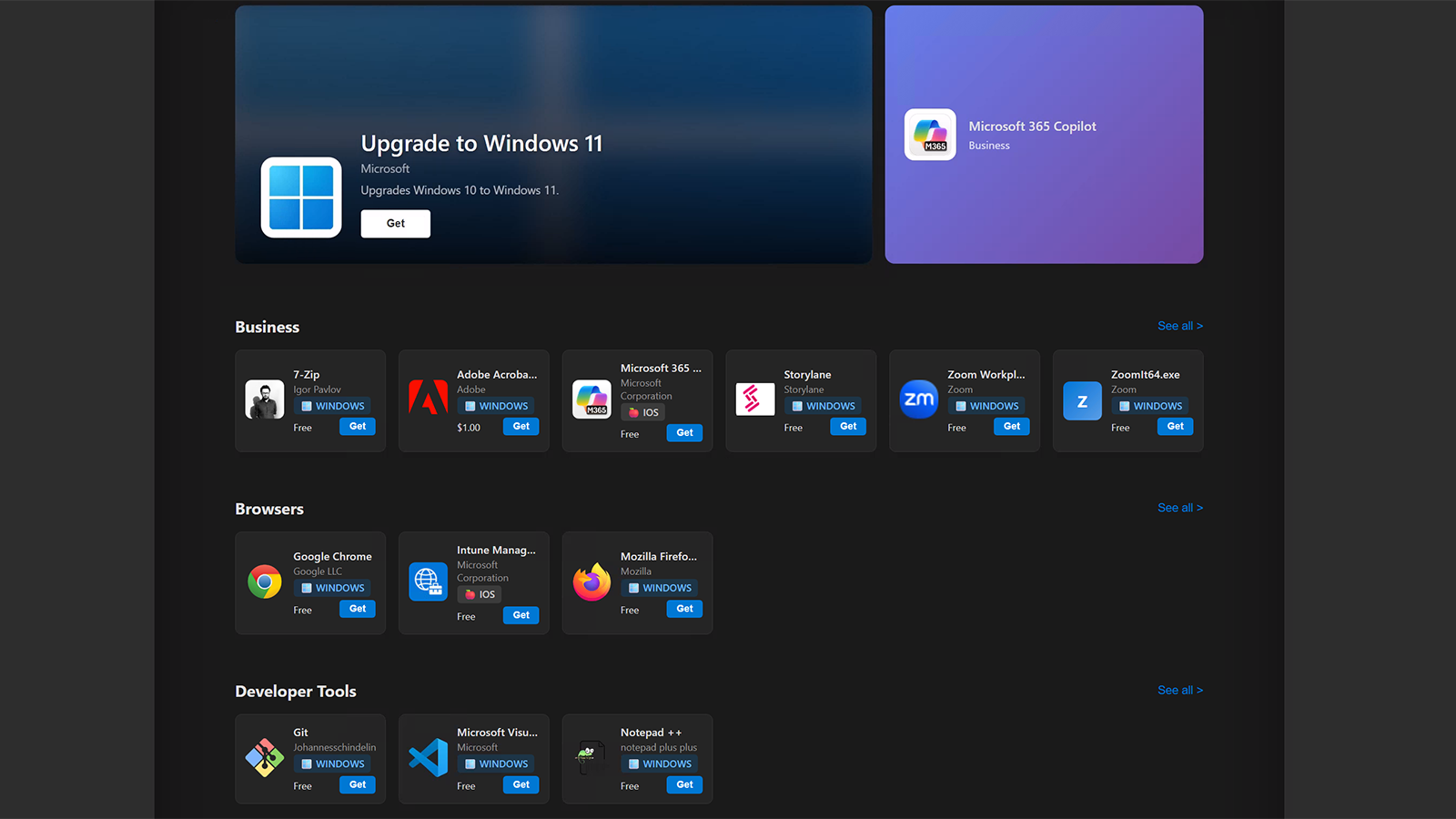
App Store for Intune extends that experience into a full request-and-approval workflow. Employees browse a branded catalog of available applications, submit requests for the ones they need, and the platform routes those requests through your approval process before deploying via Intune. IT keeps control. Users self-serve. The help-desk queue gets shorter.
Notifications and approvals flow through the tools your organization already lives in: Microsoft Teams and Outlook. Approvers don't need to log into a portal to act on a request.
What's included
- ✓ Branded self-service catalog
Your logo, your colors, your name. Looks like an internal tool, not a vendor product.
- ✓ Configurable approval workflows
Multi-stage approval with conditional rules. Route by application cost, category, platform, publisher, requester's department, or any combination.
- ✓ Teams integration
Approvers receive interactive request cards in Teams and can approve or reject without leaving the conversation.
- ✓ Actionable Outlook emails
Approval emails include inline Approve / Reject buttons. One click from inbox to deployed.
- ✓ Real-time install status
Requesters and admins see the same view: pending, downloading, installing, installed, failed.
A look at the App Store
Use the arrows to browse the screens, or select an image to enlarge it.
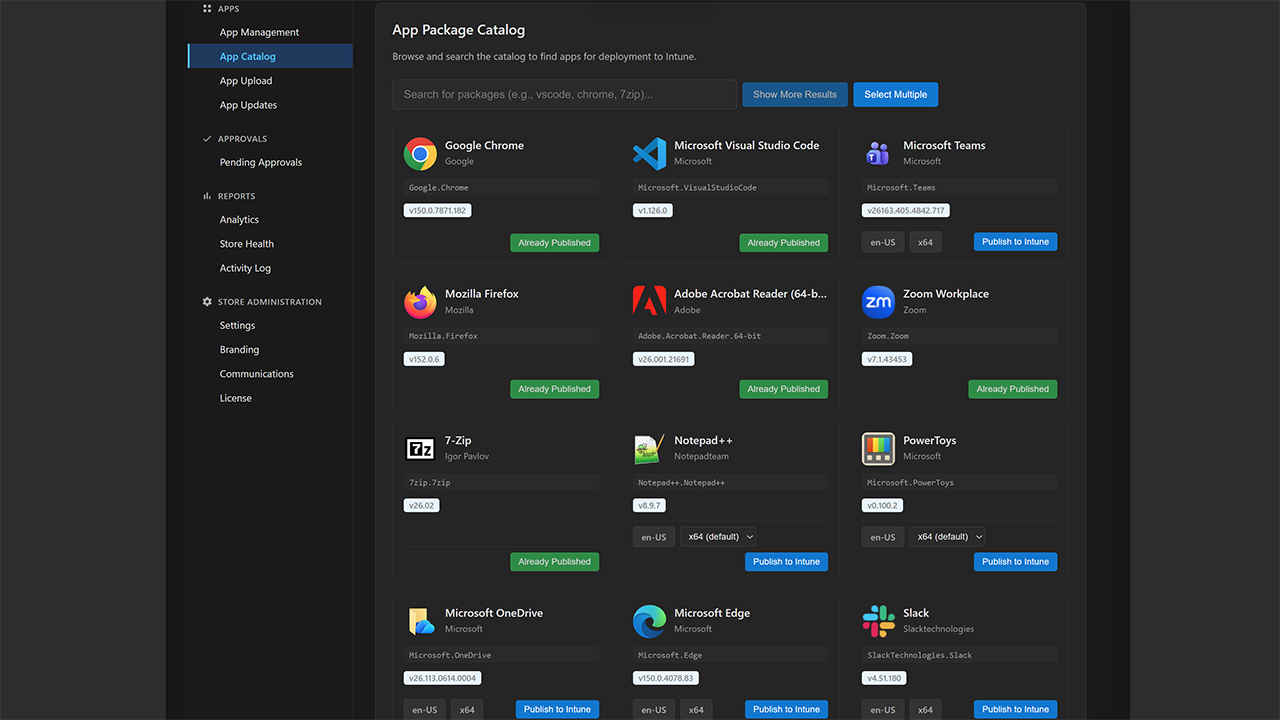
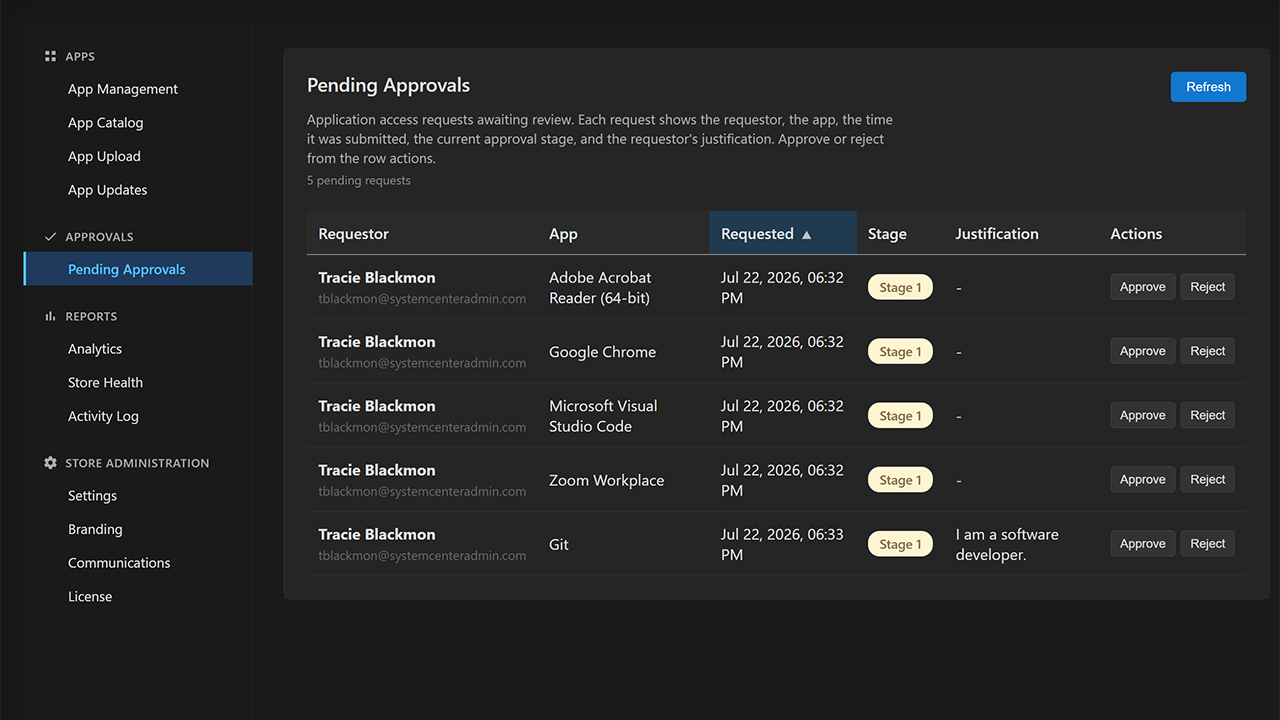
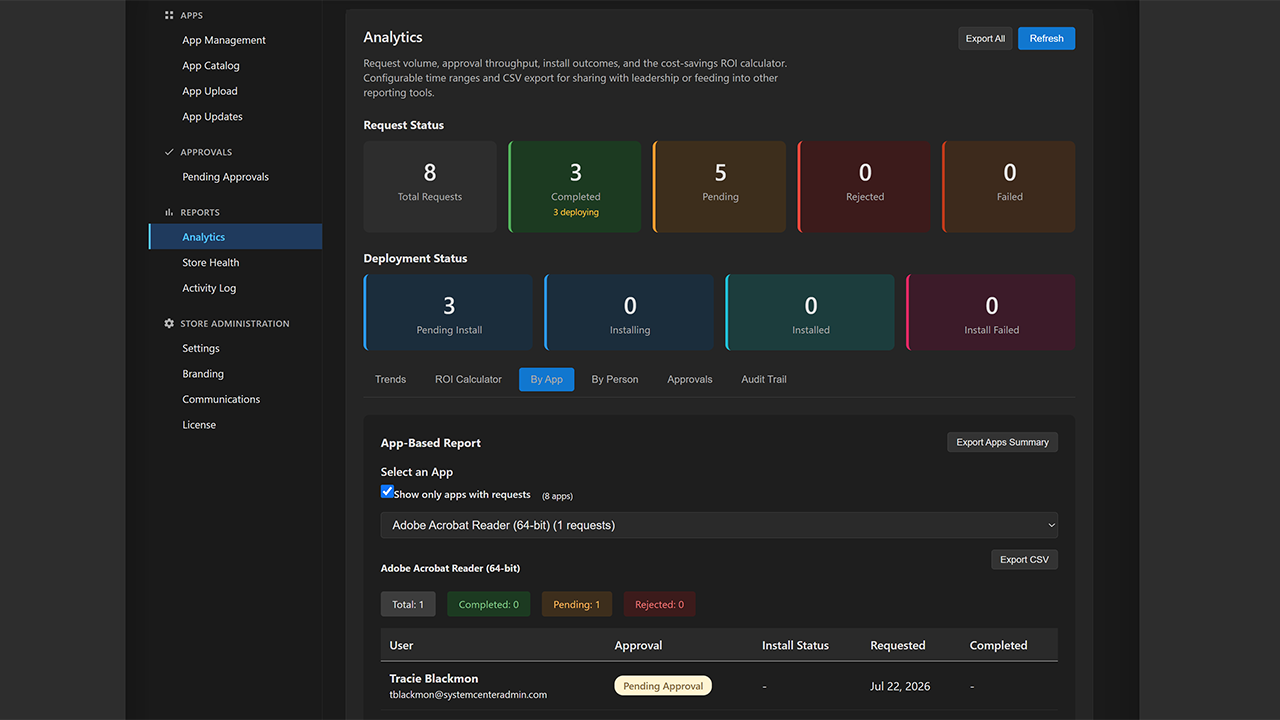
App Catalog
What Intune Enterprise Application Management should be
Intune's built-in Enterprise App Management gives you a short list of pre-packaged apps, gated behind an add-on license and stopping at the most popular titles. Real environments need more than the top of the list.
App Store for Intune turns almost any application into a deployable Win32 app inside your own tenant: over 12,000 titles from the catalog, plus your own MSI, EXE, and zip uploads. Each one is wrapped with PSADT, given ARP-based detection, converted to .intunewin, and handed to Intune's standard Win32 pipeline. No per-app licensing, no manual IntuneWinAppUtil, no packaging server to babysit.
And it keeps them current. Third-party updates are detected, re-packaged, and rolled out on your schedule through deployment rings, with rollback to a previous version if a release goes wrong. Package once, ship everywhere, patch hands-free.
We even keep the source current. Through our Monitored Apps program we track vendor releases and submit updates to the public WinGet repository when a package falls behind, so the catalog everyone draws from stays fresh, not just your tenant.
What's included
- ✓ Any app, packaged for you
Over 12,000 catalog titles plus your own MSI, EXE, and zip uploads, wrapped with PSADT and converted to
.intunewinautomatically. - ✓ ARP-based detection rules
Generated from the installer and keyed on Add/Remove Programs name, version, and publisher, so a version bump never triggers a reinstall loop.
- ✓ Automated third-party updates
New versions are detected, re-packaged, and staged for you, without rebuilding packages by hand.
- ✓ WinGet kept current at the source
We monitor vendor releases and submit updates upstream to the public WinGet repository, keeping the catalog fresh for everyone. See what we monitor.
- ✓ Ring-based rollout with rollback
Move from pilot to broad deployment on your schedule, and roll back to a previous version if a release goes wrong.
- ✓ Everything in your tenant
Packaging, storage, and identity stay inside your Azure tenant. No application content ever leaves your boundary.
We keep WinGet current, so your catalog stays fresh
WinGet is a great source for Windows apps, but it has one real weakness: nothing watches for packages falling behind. Popular apps stay current because community bots keep them fresh, while plenty of niche and enterprise apps can sit on an old version with no alert.
So we built the missing piece. We track each vendor's latest release against the version WinGet ships, and when WinGet is behind we submit the update. The fix lands in the public WinGet repository, so it helps everyone who uses WinGet, not just our customers, and your App Store catalog inherits it automatically.
See what we monitorHow it works
- ✓ Tracks vendor releases
Every monitored app's latest version is checked against the public WinGet catalog on a schedule.
- ✓ Submits the update when behind
When WinGet lags the vendor, we open a pull request to bring the package current.
- ✓ Fixes land in the open
Every fix improves the shared WinGet repository for the whole community, not a private copy.
- ✓ Request any app
Don't see an app you depend on? Ask us and we'll add it to the watch list.
ConfigMgr dynamic collections, reborn in Entra ID
ConfigMgr admins targeted deployments with query-based collections: dynamic groups that always held exactly the right machines. Intune has no equivalent that keys on what software a device actually has installed, so third-party updates get aimed at All Devices or All Users and lean on detection rules to sort out the rest.
Group Automations brings that pattern to Microsoft Intune, a feature we lovingly refer to as Cloud Collections, because it recreates ConfigMgr's query-based collections in the cloud. Point one at an application and it keeps a Microsoft Entra ID device group in sync with exactly the devices that have that app installed, refreshed daily from BI for Intune. Target an app update or a deployment ring at the group, and only the devices that actually run the app receive it.
No more blasting an update at every device and hoping detection logic skips the rest. No hand-curated group that drifts out of date the moment someone installs or removes the app. And like everything else in App Store for Intune, it runs inside your own tenant.
What's included
- ✓ Membership by installed software
Match on application name, publisher, and version, with all-of or any-of conditions.
- ✓ Daily reconciliation
Adds and removes only the difference and never rebuilds the group, so a temporary data gap can't empty it.
- ✓ Precise update targeting
Target app updates to only the devices that need them, instead of All Devices or All Users.
- ✓ New or existing groups
Create a fresh device security group, or manage one you already have.
- ✓ In your tenant
Reads BI for Intune through a managed identity. No app or device data leaves your boundary.
Preview feature. Group Automations is a preview feature. It may change before general availability, and we may withdraw it if it does not meet our quality, performance, and scale expectations in the largest environments. We do not recommend depending on it for critical production workloads yet. Try it in a limited scope, and tell us how it behaves in yours.
Capabilities
Everything you'd expect from a modern third-party patching platform, plus the things you won't get anywhere else.

Autopatch ring integration
Roll updates through your existing Autopatch deployment rings (Pilot, First Wave, Broad) instead of building a parallel ring structure. Health-gated progression pauses rollout automatically if failure rates spike.

Hash-verified packaging
Both the app manifest and the downloaded installer are SHA-256 verified before packaging. A tampered installer is rejected before it ever reaches your tenant.

Custom MSI uploads
Drop an in-house MSI directly into the portal. App Store reads the Property table, auto-generates an Add/Remove Programs detection rule, and pushes the package through the same PSADT pipeline as catalog apps.

Per-app version history & rollback
Every deployment is recorded. Roll a single app back to a previous version with one click. The two-app model means rollbacks are deploys, not deletes. No emergency repackaging at 2am.

Multi-stage approval workflows
Configurable approval workflows with conditional stages. Set rules based on application cost, category, platform, publisher, or department. IT stays in control while users self-serve what they need.

Self-service catalog
Branded portal where employees browse available applications and submit requests. Routes through your approval workflow, then auto-deploys via Intune. Cuts down on help-desk tickets for app installs.

Real-time install status
Pull install status from Intune's reporting API (pending, downloading, installing, installed, failed) per device, in real time. Requesters and admins both see the same view.

Email & Teams notifications
Configurable notifications via email and Microsoft Teams. Requesters receive updates when their request is approved, deployed, or installed. Admins get notified when action is needed.

Corporate branding
Customize the portal with your organization's logo, colors, and name. Employees see a branded experience that looks like an internal tool, not a third-party product.
Programmatic API access
Full REST API with JWT Bearer auth (Entra ID app registrations). Upload custom MSIs from your CI/CD pipeline, trigger update detection from a CVE feed, pull deployment status into your monitoring dashboard. Documented at docs.powerstacks.com with PowerShell examples.
Coming soon
Items on the active roadmap. Early customers help shape what lands first.
VM-based smoke testing
RoadmapBefore a freshly packaged app reaches your production rings, an isolated Windows VM in your tenant tries to install it and reports success or failure. No more "we shipped the package and 200 endpoints failed at install time."
AI-assisted failure analysis
RoadmapWhen a deployment fails, the agent service uses an LLM running in your tenant to summarize the application installation logs and propose a fix. Cuts the time-to-diagnose for the long-tail of weird installer failures.
PSADT branding customization
RoadmapCustomize the PSADT install/uninstall toast notifications, banner imagery, and prompt copy through the portal UI, instead of editing PSADT scripts by hand for every package.
Pricing
App Store for Intune is sold as an annual subscription sized to your environment.
Azure architecture

Azure App Service
Linux App Service Plan hosting the .NET 8 API and React SPA. B2 tier for small deployments, S1+ for production.

Azure SQL Database
Application data, request history, approval records, and packaging cache. Auto-migrating schema on startup.

Azure Blob Storage
Queue-based packaging pipeline, custom-upload staging, and PSADT template caching.

Azure Key Vault
Client secrets, connection strings, and API keys. Referenced directly from App Service configuration.

Application Insights
Monitoring, logging, performance tracking. Integrated with the .NET backend for full request tracing.

Microsoft Graph API
Entra ID authentication, Intune app deployment, group management, install status reporting.
Run App Store in your tenant
Start a free trial, or contact us for a pricing quote sized to your environment.