WinGet is a great source for Windows apps: free, Microsoft-native, and huge. Its one real weakness is that there’s no floor under freshness. Popular apps tend to stay current, some maintained by their own vendors, others kept fresh by community bots. But plenty of niche and enterprise apps have neither watching them, and they can sit on an old version with no alert. I wrote about that in more detail in Is WinGet Enterprise Ready?. This post is the short version of what we’re doing about it.
What Monitored Apps does
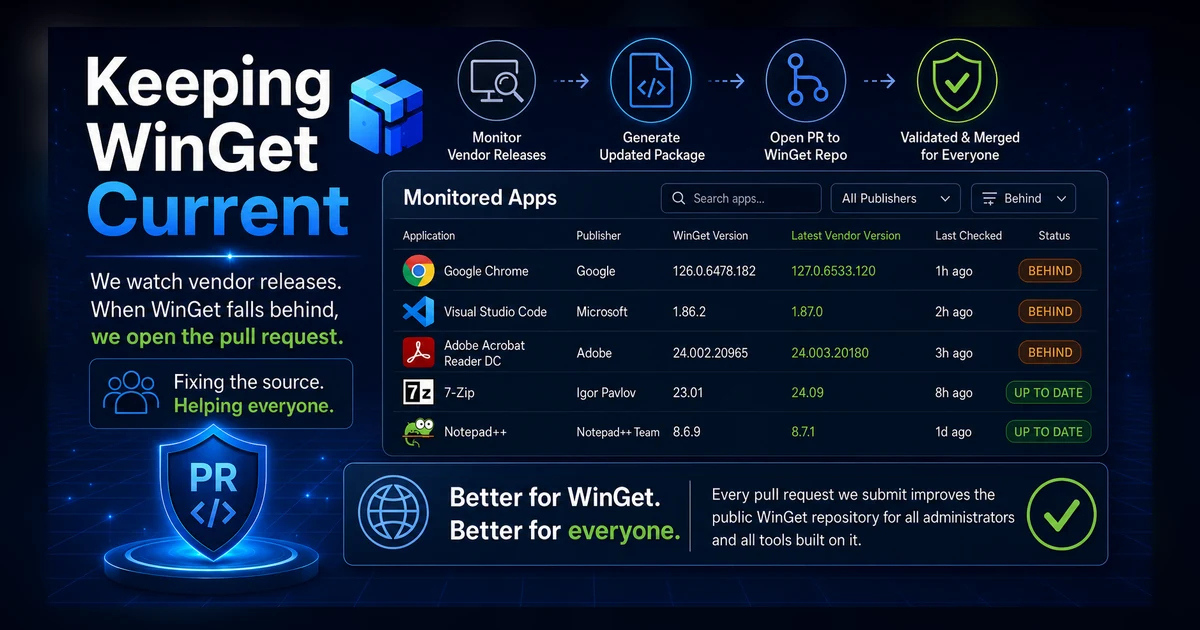
For every app on our watch list, we check the vendor’s latest release against the version WinGet ships. When WinGet is behind, we open a pull request to bring it current, using Komac, the same open-source tool the community’s busiest contributors use. The fix goes into the public WinGet repository, so everyone who uses WinGet benefits, not just our customers.
You can watch it happen on the Monitored Apps page. For each app it shows the publisher, the WinGet version, the vendor’s latest version, and when we last checked. Search it, filter it by publisher, or filter to just the apps that are currently behind.
Why it’s in the open
We could keep a private, patched copy of the catalog to ourselves. We’d rather fix the source. When we submit a version bump to WinGet, it improves the catalog for every admin running winget upgrade and every tool built on top of the community repository. That’s the whole idea: make the shared thing better instead of hoarding a better copy.
It also runs in our own infrastructure on public package data. Nothing about this reaches into your tenant, and a WinGet pull request carries no customer information.
Request an app
The list grows over time, and the fastest way to get an app added is to ask. Head to the Monitored Apps page and use the “Request an app to be monitored” form. Tell us the app and vendor, and if you happen to know the WinGet package identifier, include it. We’ll do our best to add it. Most apps are straightforward, but some are harder, and once in a while one just isn’t practical to monitor automatically. When that happens we’ll try everything we can, up to reaching out to the vendor. For the ones we can watch, when the WinGet package falls behind we’ll work to bring it current.
No cost, no catch. If you deploy it through App Store for Intune, you get the fresh package automatically. If you don’t, you still get a fresher WinGet. Either way, it’s one less thing to chase by hand.