Recent Releases
The 6 most recent releases are listed below. For older versions, see the release archive.
Version 15.0 February 26, 2026
Section titled Version 15.0 February 26, 2026Release Date: February 26, 2026
AppSource Version: 1015
Summary
Section titled “Summary”BI for Defender v15 expands visibility into software artifacts and improves Secure Score navigation. This release introduces new objects for software file paths and registry paths for investigative reporting, and improves performance by optimizing vulnerability-related measures and adding direct links to remediation controls and recommendations.
Product Enhancements
Section titled “Product Enhancements”- Updated the Secure Score page to include direct links to control details from the Control Name field.
- Updated the Missing Security Updates page to include a direct link to the Recommendation Name for easier remediation access.
- Optimized performance of vulnerability-related measures within the Device object.
New Features
Section titled “New Features”- Added new object Software Devices File Path to provide visibility into associated file paths.
- Added new object Software Devices Registry Path to provide visibility into associated registry paths.
Semantic Model Changes
Section titled “Semantic Model Changes”- Added new fields to the Software Devices File Path object: File Path, File Path Count.
- Added new fields to the Software Devices Registry Path object: Registry Path, Registry Path Count.
- Added Control Link field to the Secure Score Control object.
- Added Recommendation Link field to the Vulnerability Recommendation object.
- Removed measures Missing Security Updates Average, Vulnerabilities Detected Average, and Vulnerabilities Exploitable Average from the Device object due to performance considerations.
- Optimized measures Missing Security Updates Count, Vulnerabilities Detected Count, and Vulnerabilities Exploitable Count within the Device object for improved sync performance.
Important Notes
Section titled “Important Notes”- Always back up your custom reports before upgrading.
Version 14.0 Jan. 23, 2026
Section titled Version 14.0 Jan. 23, 2026Release Date: January 23, 2026
AppSource Version: 1014
Summary
Section titled “Summary”BI for Defender v14 expands device tagging and enhances vulnerability reporting. This release adds support for System device tags, updates tagging behavior for inactive devices, and consolidates vulnerability fields into the Device object for clearer, more consistent reporting.
Product Enhancements
Section titled “Product Enhancements”- Added support for System device tags within the Device Tag object.
- Updated tagging behavior so that manual tags on inactive devices may appear as System.
Semantic Model Changes
Section titled “Semantic Model Changes”- Removed the Vulnerabilities field from the Software Vulnerabilities object. It has been replaced by Vulnerabilities Detected in the Device object.
- Added new fields to the Device object: Missing Security Updates, Missing Security Updates Average, Missing Security Updates Count, Vulnerabilities Detected, Vulnerabilities Detected Average, Vulnerabilities Detected Count, Vulnerabilities Exploitable, Vulnerabilities Exploitable Average, Vulnerabilities Exploitable Count.
Important Notes
Section titled “Important Notes”- Always back up your custom reports before upgrading.
Version 13.0 Nov. 24, 2025
Section titled Version 13.0 Nov. 24, 2025Release Date: November 24, 2025
AppSource Version: 1013
Summary
Section titled “Summary”BI for Defender v13 is a small maintenance release that fixes minor issues affecting a limited number of customers.
Bug Fixes
Section titled “Bug Fixes”- Resolved an issue on the Missing Security Updates page where some missing vulnerabilities had no linked devices.
Important Notes
Section titled “Important Notes”- Always back up your custom reports before upgrading.
Version 12.0 Oct. 12, 2025
Section titled Version 12.0 Oct. 12, 2025Release Date: October 12, 2025
AppSource Version: 1012
Summary
Section titled “Summary”BI for Defender v12 improves Cloud App reporting reliability and adds enhanced filtering. This release adds tag-based parameters to control which Cloud Apps load during sync (reducing timeouts in large environments), adds activity metrics to the Cloud App object, and renames key download and upload fields. Review the breaking changes if you reference Cloud App data in custom reports.
Product Enhancements
Section titled “Product Enhancements”- Improved Cloud App sync reliability by introducing tag-based filtering to control which Cloud Apps are loaded during sync.
- Added new fields to the Cloud App page: Cloud App Device Count, Cloud App IP Address Count, and Cloud App Transaction Count, to improve visibility into Cloud App activity metrics.
New Features
Section titled “New Features”- Added new parameter AzureAD Cloud App Tags Only to the semantic model (Default: True). When enabled, only Cloud Apps with matching tags defined in AzureAD Cloud App Tags are loaded during sync.
- Added new parameter AzureAD Cloud App Tags to the semantic model. Specify a comma-separated list of Cloud App tags to include during sync.
Semantic Model Changes
Section titled “Semantic Model Changes”- Added new fields to the Cloud App object: Cloud App Device Count, Cloud App IP Address Count, Cloud App Transaction Count.
- Renamed Download (MB) to Cloud App Download (MB) on the Cloud App object. See the Important Notes section.
- Renamed Upload (MB) to Cloud App Upload (MB) on the Cloud App object. See the Important Notes section.
Important Notes
Section titled “Important Notes”- Renamed Download (MB) to Cloud App Download (MB) on the Cloud App object. This is a breaking change. Custom reports referencing the previous field name must be updated.
- Renamed Upload (MB) to Cloud App Upload (MB) on the Cloud App object. This is a breaking change. Custom reports referencing the previous field name must be updated.
- Always back up your custom reports before upgrading.
Version 11.0 Oct. 3, 2025
Section titled Version 11.0 Oct. 3, 2025Release Date: October 3, 2025 App Source Version: 1011
Summary
Section titled “Summary”BI for Defender v11 is a major update that adds several new report pages and hundreds of new data fields covering users, cloud apps, and antivirus status, along with compliance framework data. Before syncing, you must add a new permission to the app registration (see Important Notes).
Product Enhancements
Section titled “Product Enhancements”- Changed how we determine the number of clients for licensing purposes. We now only count “Active”, “Onboarded” devices that are not “Excluded” in Microsoft Defender.
New Features
Section titled “New Features”- Added new “User Info” page.
- Added new “Cloud App” page.
- Added new “Antivirus” page.
- Updated the “Incident & Alerts” page to include an “IP Address” visual.
Semantic Model Changes
Section titled “Semantic Model Changes”- Added new parameter “AzureAD Alert Enable” (Default: TRUE).
- Added new parameter “AzureAD Cloud App Day(s)” (Possible values: 7, 30, 90 days; -1 = Disabled).
- Removed “IP Address” from the “Device Network” object.
- Updated the “Last Logon User” object → Added Local Sign-In User as part of the “User” object.
- Updated the “Alert Evidence” object → Added Local Sign-In User as part of the “User” object and added “IP Address” as part of the “IP Address” object.
- Updated the “Device” object → Added “IP Address” as part of the “IP Address” object.
- Updated the “Software Vulnerabilities” object. New fields include:“Missing Security Update ID”
- “Missing Security Update URL”. Updated the “IP Address” object. New fields include:
- “IP Address”
- “IP Address Count” Updated the “Software Vulnerabilities” object. New fields include:
- “Last Update”
- “Last Update (Days)” Updated the “Secure Configuration” object. New fields include:
- “Last Update”
- “Last Update (Days)” Updated the “User” object. New fields include:
- “Account Enabled”
- “Azure AD”
- “City”
- “Company”
- “Country”
- “Department”
- “Directory Distinguished Name”
- “Directory Last Sync”
- “Directory Last Sync (Days)”
- “Directory Synced”
- “Directory User Name”
- “Email Address”
- “Employee ID”
- “Attribute 1”
- “Attribute 2”
- “Attribute 3”
- “Attribute 4”
- “Attribute 5”
- “Attribute 6”
- “Attribute 7”
- “Attribute 8”
- “Attribute 9”
- “Attribute 10”
- “Attribute 11”
- “Attribute 12”
- “Attribute 13”
- “Attribute 14”
- “Attribute 15”
- “First Name”
- “Full Name”
- “Last Name”
- “Mobile Phone”
- “Office”
- “Password Last Change”
- “Password Last Change (Days)”
- “Place”
- “Postal Code”
- “State”
- “Street Address”
- “Title”
- “User Type” Updated the “User Manager” object. New fields include:
- “Manager Company”
- “Manager Department”
- “Manager Email Address”
- “Manager Employee ID”
- “Manager First Name”
- “Manager Full Name”
- “Manager Last Name”
- “Manager Mobile Phone”
- “Manager Title” Updated the “User Proxy Addresses” object. New fields include:
- “Proxy Address” Updated the “Authorization” object. New fields include:
- “Viewer Email” Updated the “Cloud App” object. New fields include:
- “Category”
- “Cloud App Count”
- “Cloud App Name”
- “Cloud App Tag”
- “Download (MB)”
- “Last Seen”
- “Last Seen (Days)”
- “Risk Score”
- “Upload (MB)” Updated the “Cloud App Data Type” object. New fields include:
- “Data Type” Updated the “Cloud App Details” object. New fields include:
- “Cloud App Data Type”
- “Cloud App Logon URL”
- “CSA STAR Level”
- “Data Center”
- “Data Retention Policy”
- “Domain Registration”
- “Domain Registration (Days)”
- “Encryption Protocol”
- “FedRAMP Level”
- “Founded”
- “GDPR Readiness Statement”
- “Headquarters”
- “Holding”
- “Holding Company”
- “Is Admin Audit Trail”
- “Is COBIT Compliant”
- “Is COPPA Compliant”
- “Is Data Audit Trail”
- “Is Data Classification”
- “Is Data Ownership”
- “Is Disaster Recovery Plan”
- “Is DMCA”
- “Is FERPA Compliant”
- “Is FFIEC Compliant”
- “Is File Sharing”
- “Is FINRA Compliant”
- “Is FISMA Compliant”
- “Is GAAP Compliant”
- “Is GDPR Data Protection Impact Assessment”
- “Is GDPR Data Protection Officer”
- “Is GDPR Secure Cross Border Data Transfer”
- “Is GDPR Lawful Basis For Processing”
- “Is GDPR Report Data Breaches”
- “Is GDPR Right To Access”
- “Is GDPR Right To Be Informed”
- “Is GDPR Right To Data Portability”
- “Is GDPR Right To Erasure”
- “Is GDPR Right To Object”
- “Is GDPR Right To Rectification”
- “Is GDPR Right To Restriction Of Processing”
- “Is GDPR Rights Related To Automated Decision Making”
- “Is GLBA Compliant”
- “Is HIPAA Compliant”
- “Is HITRUST CSF Compliant”
- “Is HTTP Security Headers Content Security Policy”
- “Is HTTP Security Headers Strict Transport Security”
- “Is HTTP Security Headers X-Content-Type-Options”
- “Is HTTP Security Headers X-Frame-Options”
- “Is HTTP Security Headers X-XSS-Protection”
- “Is IP Address Restriction”
- “Is ISAE 3402 Compliant”
- “Is ISO 27001 Compliant”
- “Is ISO 27017 Compliant”
- “Is ISO 27018 Compliant”
- “Is ITAR Compliant”
- “Is Multi-Factor Authentication”
- “Is Password Policy Change Password Period”
- “Is Password Policy Character Combination”
- “Is Password Policy Password History And Reuse”
- “Is Password Policy Length Limit”
- “Is Password Personal Information Use”
- “Is Penetration Testing”
- “Is Privacy Shield Compliant”
- “Is Remember Password”
- “Is Requires User Authentication”
- “Is SOC 1 Compliant”
- “Is SOC 2 Compliant”
- “Is SOC 3 Compliant”
- “Is SOX Compliant”
- “Is SP 800-53 Compliant”
- “Is SSAE 16 Compliant”
- “Is Supports SAML”
- “Is Trusted Certificate”
- “Is User Audit Trail”
- “Is User Can Upload Data”
- “Is User Roles Support”
- “Is Valid Certificate Name”
- “Latest Breach”
- “Latest Breach (Days)”
- “PCI DSS Version”
- “Vendor” Updated the “Cloud App Logon URL” object. New fields include:
- “Logon URL” Updated the “Cloud App Tag” object. New fields include:
- “Tag” Updated the “Device AntiVirus” object. New fields include:
- “AntiVirus Active”
- “AntiVirus Active Rate (%)”
- “AntiVirus Disabled”
- “AntiVirus EDR Blocked”
- “AntiVirus Mode”
- “AntiVirus Other”
- “AntiVirus Passive”
- “AntiVirus Passive Audit”
- “Engine Update”
- “Engine Update (Days)”
- “Engine Version”
- “Full Scan”
- “Full Scan (Days)”
- “Is Engine Up-To-Date”
- “Is Platform Up-To-Date”
- “Is Signature Up-To-Date”
- “Last Update”
- “Last Update (Days)”
- “Platform Update”
- “Platform Update (Days)”
- “Platform Version”
- “Quick Scan”
- “Quick Scan (Days)”
- “Quick Scan Error Code”
- “Quick Scan Status”
- “Signature Published On”
- “Signature Published On (Days)”
- “Signature Update”
- “Signature Update (Days)”
- “Signature Version”
Important Notes
Section titled “Important Notes”- [Action Required] This version requires an additional permission on the Microsoft Entra ID app registration. Add CloudApp-Discovery.Read.All to your app registration before syncing, or the sync will fail.
- Always back up your custom reports before upgrading.
New Cloud App Page
Section titled “New Cloud App Page”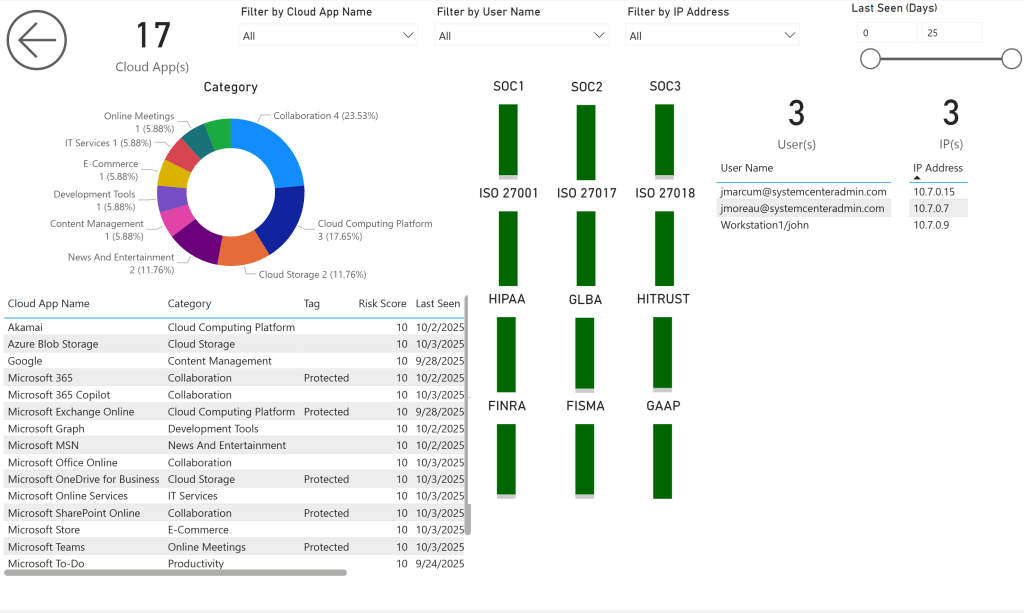
New Antivirus Page
Section titled “New Antivirus Page”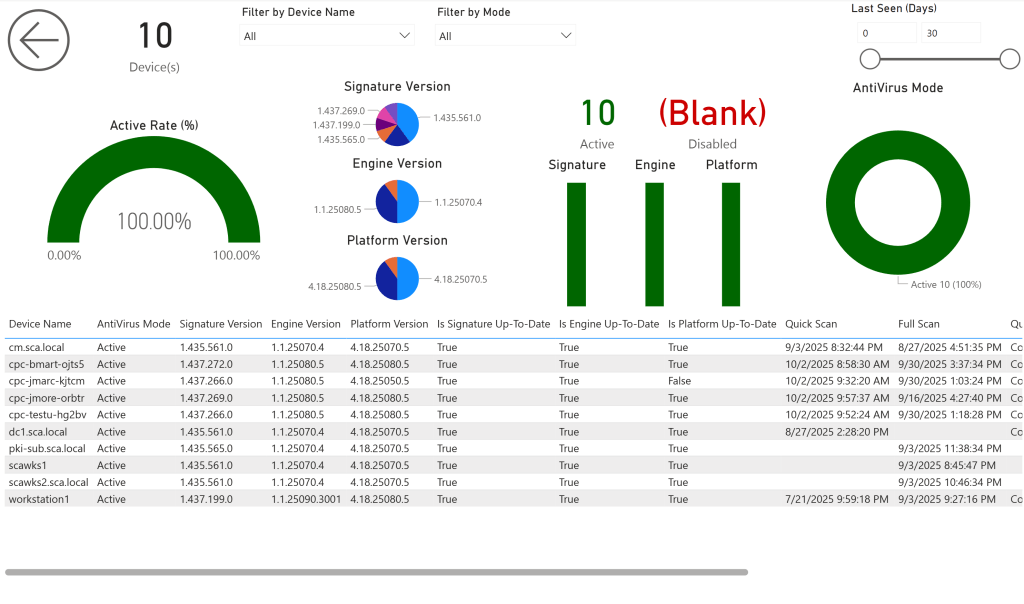
New User Info Page
Section titled “New User Info Page”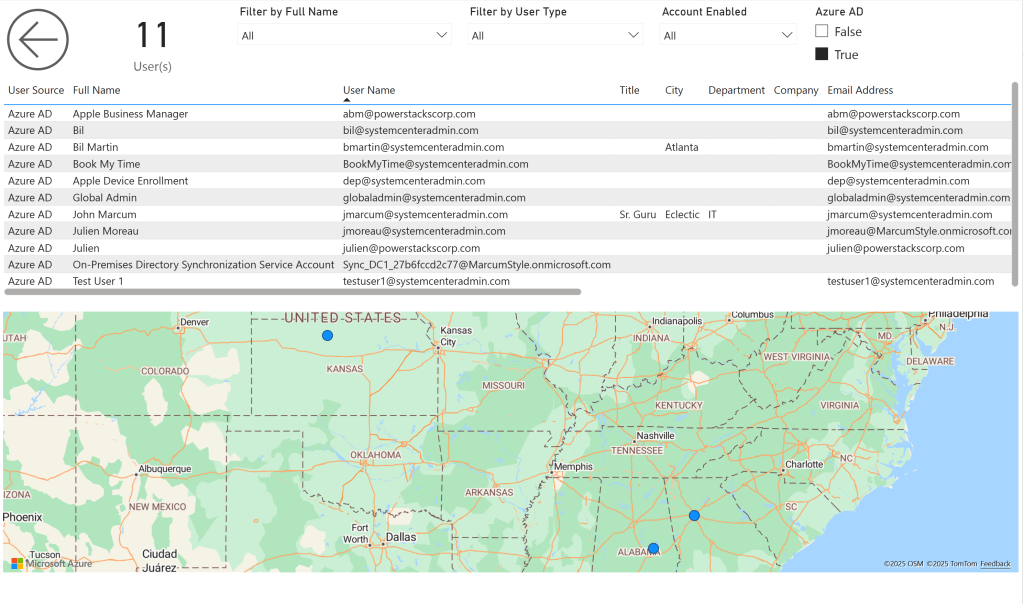
Version 10.0 June 15, 2025
Section titled Version 10.0 June 15, 2025Release Date: June 15, 2025
AppSource Version: 1010
Summary
Section titled “Summary”BI for Defender v10 is a small maintenance release that fixes minor sync and visual timeout issues and adds a customer-requested User Manager object.
Bug Fixes
Section titled “Bug Fixes”- Fixed a bug causing sync timeouts when the AzureAD Export URL Enable parameter is set to False.
- Resolved an issue on the Device Info page where a Last Logon without a User SID caused a visual timeout.
Semantic Model Changes
Section titled “Semantic Model Changes”- Added the User Manager object, aligning with the User Manager object in BI for Intune. New fields: Manager Count, Manager User ID, Manager User Name.
Important Notes
Section titled “Important Notes”- If you missed version 8.0, review the critical change related to vulnerabilities and security update filtering.
- Always back up your custom reports before upgrading.