Version 11.0 Oct. 3, 2025
Release Date: October 3, 2025 App Source Version: 1011
Summary
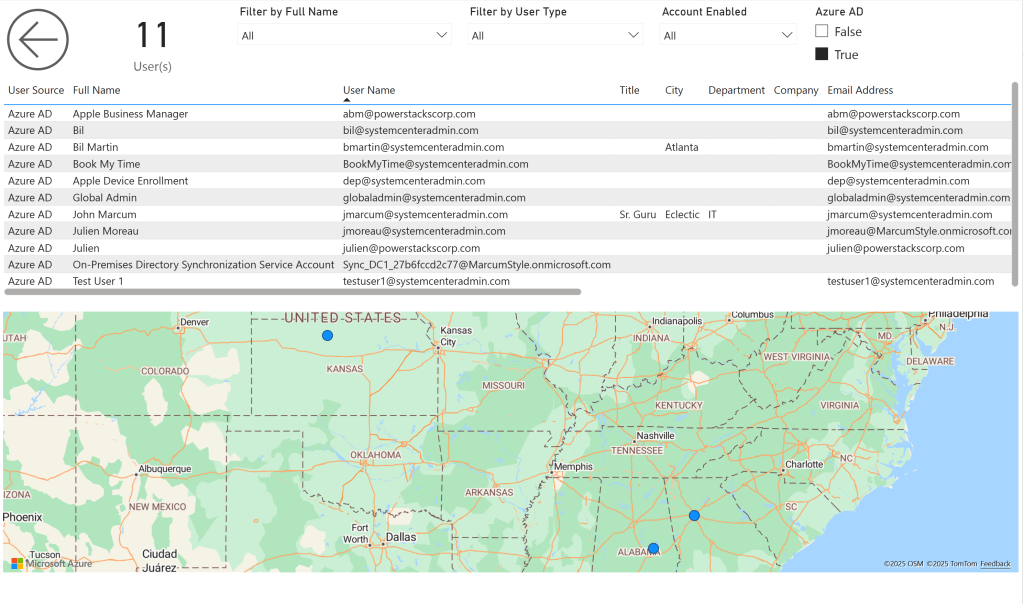
Section titled “Summary”BI for Defender v11 is a major update that adds several new report pages and hundreds of new data fields covering users, cloud apps, and antivirus status, along with compliance framework data. Before syncing, you must add a new permission to the app registration (see Important Notes).
Product Enhancements
Section titled “Product Enhancements”- Changed how we determine the number of clients for licensing purposes. We now only count “Active”, “Onboarded” devices that are not “Excluded” in Microsoft Defender.
New Features
Section titled “New Features”- Added new “User Info” page.
- Added new “Cloud App” page.
- Added new “Antivirus” page.
- Updated the “Incident & Alerts” page to include an “IP Address” visual.
Semantic Model Changes
Section titled “Semantic Model Changes”- Added new parameter “AzureAD Alert Enable” (Default: TRUE).
- Added new parameter “AzureAD Cloud App Day(s)” (Possible values: 7, 30, 90 days; -1 = Disabled).
- Removed “IP Address” from the “Device Network” object.
- Updated the “Last Logon User” object → Added Local Sign-In User as part of the “User” object.
- Updated the “Alert Evidence” object → Added Local Sign-In User as part of the “User” object and added “IP Address” as part of the “IP Address” object.
- Updated the “Device” object → Added “IP Address” as part of the “IP Address” object.
- Updated the “Software Vulnerabilities” object. New fields include:“Missing Security Update ID”
- “Missing Security Update URL”. Updated the “IP Address” object. New fields include:
- “IP Address”
- “IP Address Count” Updated the “Software Vulnerabilities” object. New fields include:
- “Last Update”
- “Last Update (Days)” Updated the “Secure Configuration” object. New fields include:
- “Last Update”
- “Last Update (Days)” Updated the “User” object. New fields include:
- “Account Enabled”
- “Azure AD”
- “City”
- “Company”
- “Country”
- “Department”
- “Directory Distinguished Name”
- “Directory Last Sync”
- “Directory Last Sync (Days)”
- “Directory Synced”
- “Directory User Name”
- “Email Address”
- “Employee ID”
- “Attribute 1”
- “Attribute 2”
- “Attribute 3”
- “Attribute 4”
- “Attribute 5”
- “Attribute 6”
- “Attribute 7”
- “Attribute 8”
- “Attribute 9”
- “Attribute 10”
- “Attribute 11”
- “Attribute 12”
- “Attribute 13”
- “Attribute 14”
- “Attribute 15”
- “First Name”
- “Full Name”
- “Last Name”
- “Mobile Phone”
- “Office”
- “Password Last Change”
- “Password Last Change (Days)”
- “Place”
- “Postal Code”
- “State”
- “Street Address”
- “Title”
- “User Type” Updated the “User Manager” object. New fields include:
- “Manager Company”
- “Manager Department”
- “Manager Email Address”
- “Manager Employee ID”
- “Manager First Name”
- “Manager Full Name”
- “Manager Last Name”
- “Manager Mobile Phone”
- “Manager Title” Updated the “User Proxy Addresses” object. New fields include:
- “Proxy Address” Updated the “Authorization” object. New fields include:
- “Viewer Email” Updated the “Cloud App” object. New fields include:
- “Category”
- “Cloud App Count”
- “Cloud App Name”
- “Cloud App Tag”
- “Download (MB)”
- “Last Seen”
- “Last Seen (Days)”
- “Risk Score”
- “Upload (MB)” Updated the “Cloud App Data Type” object. New fields include:
- “Data Type” Updated the “Cloud App Details” object. New fields include:
- “Cloud App Data Type”
- “Cloud App Logon URL”
- “CSA STAR Level”
- “Data Center”
- “Data Retention Policy”
- “Domain Registration”
- “Domain Registration (Days)”
- “Encryption Protocol”
- “FedRAMP Level”
- “Founded”
- “GDPR Readiness Statement”
- “Headquarters”
- “Holding”
- “Holding Company”
- “Is Admin Audit Trail”
- “Is COBIT Compliant”
- “Is COPPA Compliant”
- “Is Data Audit Trail”
- “Is Data Classification”
- “Is Data Ownership”
- “Is Disaster Recovery Plan”
- “Is DMCA”
- “Is FERPA Compliant”
- “Is FFIEC Compliant”
- “Is File Sharing”
- “Is FINRA Compliant”
- “Is FISMA Compliant”
- “Is GAAP Compliant”
- “Is GDPR Data Protection Impact Assessment”
- “Is GDPR Data Protection Officer”
- “Is GDPR Secure Cross Border Data Transfer”
- “Is GDPR Lawful Basis For Processing”
- “Is GDPR Report Data Breaches”
- “Is GDPR Right To Access”
- “Is GDPR Right To Be Informed”
- “Is GDPR Right To Data Portability”
- “Is GDPR Right To Erasure”
- “Is GDPR Right To Object”
- “Is GDPR Right To Rectification”
- “Is GDPR Right To Restriction Of Processing”
- “Is GDPR Rights Related To Automated Decision Making”
- “Is GLBA Compliant”
- “Is HIPAA Compliant”
- “Is HITRUST CSF Compliant”
- “Is HTTP Security Headers Content Security Policy”
- “Is HTTP Security Headers Strict Transport Security”
- “Is HTTP Security Headers X-Content-Type-Options”
- “Is HTTP Security Headers X-Frame-Options”
- “Is HTTP Security Headers X-XSS-Protection”
- “Is IP Address Restriction”
- “Is ISAE 3402 Compliant”
- “Is ISO 27001 Compliant”
- “Is ISO 27017 Compliant”
- “Is ISO 27018 Compliant”
- “Is ITAR Compliant”
- “Is Multi-Factor Authentication”
- “Is Password Policy Change Password Period”
- “Is Password Policy Character Combination”
- “Is Password Policy Password History And Reuse”
- “Is Password Policy Length Limit”
- “Is Password Personal Information Use”
- “Is Penetration Testing”
- “Is Privacy Shield Compliant”
- “Is Remember Password”
- “Is Requires User Authentication”
- “Is SOC 1 Compliant”
- “Is SOC 2 Compliant”
- “Is SOC 3 Compliant”
- “Is SOX Compliant”
- “Is SP 800-53 Compliant”
- “Is SSAE 16 Compliant”
- “Is Supports SAML”
- “Is Trusted Certificate”
- “Is User Audit Trail”
- “Is User Can Upload Data”
- “Is User Roles Support”
- “Is Valid Certificate Name”
- “Latest Breach”
- “Latest Breach (Days)”
- “PCI DSS Version”
- “Vendor” Updated the “Cloud App Logon URL” object. New fields include:
- “Logon URL” Updated the “Cloud App Tag” object. New fields include:
- “Tag” Updated the “Device AntiVirus” object. New fields include:
- “AntiVirus Active”
- “AntiVirus Active Rate (%)”
- “AntiVirus Disabled”
- “AntiVirus EDR Blocked”
- “AntiVirus Mode”
- “AntiVirus Other”
- “AntiVirus Passive”
- “AntiVirus Passive Audit”
- “Engine Update”
- “Engine Update (Days)”
- “Engine Version”
- “Full Scan”
- “Full Scan (Days)”
- “Is Engine Up-To-Date”
- “Is Platform Up-To-Date”
- “Is Signature Up-To-Date”
- “Last Update”
- “Last Update (Days)”
- “Platform Update”
- “Platform Update (Days)”
- “Platform Version”
- “Quick Scan”
- “Quick Scan (Days)”
- “Quick Scan Error Code”
- “Quick Scan Status”
- “Signature Published On”
- “Signature Published On (Days)”
- “Signature Update”
- “Signature Update (Days)”
- “Signature Version”
Important Notes
Section titled “Important Notes”- [Action Required] This version requires an additional permission on the Microsoft Entra ID app registration. Add CloudApp-Discovery.Read.All to your app registration before syncing, or the sync will fail.
- Always back up your custom reports before upgrading.
New Cloud App Page
Section titled “New Cloud App Page”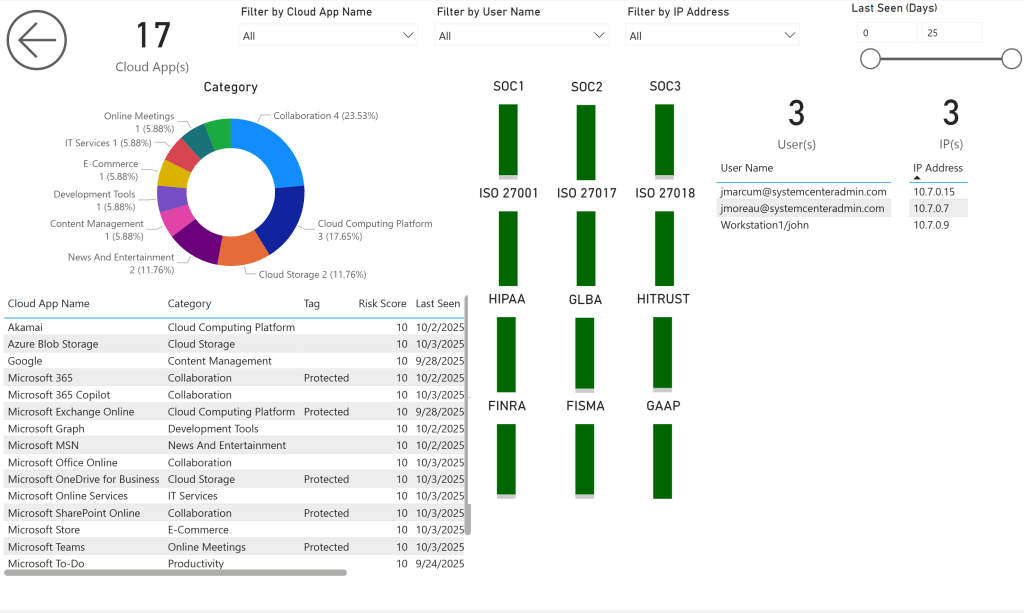
New Antivirus Page
Section titled “New Antivirus Page”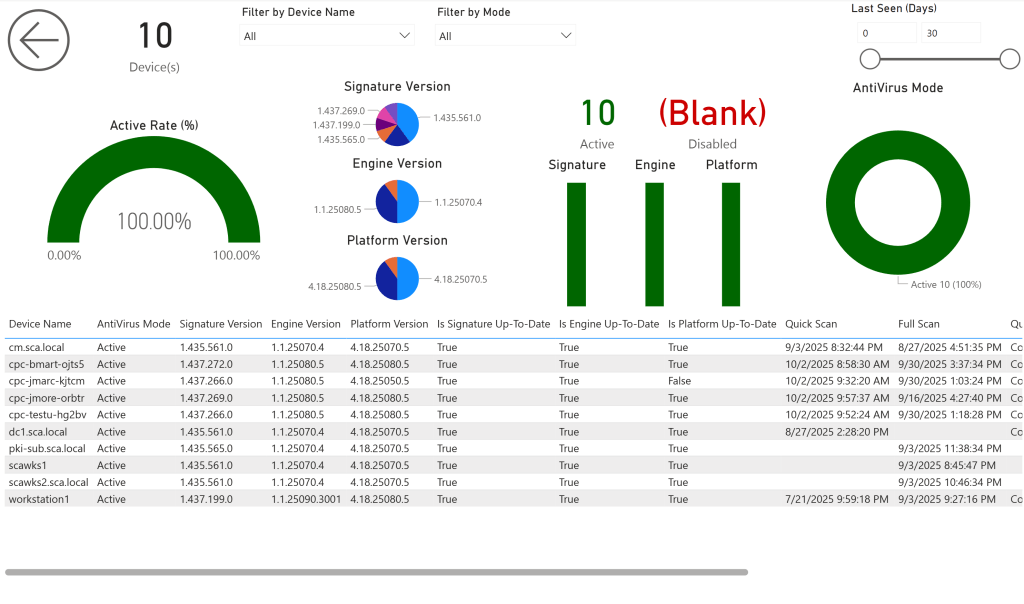
New User Info Page
Section titled “New User Info Page”