Version 34.0 March 4, 2024
BI for Intune Version 34.0, shown as version 1030 in AppSource, was released on March 4, 2024.
This version introduces our Enhanced Inventory for macOS.
Below Are The Changes in Version 34.0
Section titled “Below Are The Changes in Version 34.0”- **Features:**Custom inventory for macOS. See below for details.A new field “App Inventory Install Path” has been added for MacOS Enhancements:
- Optimized code for faster refresh times when large number of drivers are approved. Bug Fixes:
- N/A Important Notes:
- Always backup your custom reports using our backup process.
Introducing Enhanced Inventory for macOS
Section titled “Introducing Enhanced Inventory for macOS”We have been using PowerShell to collect information that Intune does not natively collect from Windows devices for quite a while. Most customers using a remediation script as a method to schedule the script to run on a reoccurring basis. We are now doing the same for macOS using a bash script. We created this script at the request of a customer. It collects the installed software from macOS and sends that to Log Analytics just like our PowerShell script does on Windows. You can deploy the script as a Shell script from Intune. Ideally the script should be run once per day on each device. This way any changes to the device get captured.
Below is the inventory script for macOS. Make sure you configure the CustomerID and SharedKey according to our documentation here.
Batch#!/bin/bash# Replace with your Log Analytics Workspace IDCustomerId=""# Replace with your Primary KeySharedKey=""#Control if you want to collect App or Device Inventory or both (True = Collect)CollectDeviceInventory=falseCollectAppInventory=true# You can use an optional field to specify the timestamp from the data. If the time field is not specified, Azure Monitor assumes the time is the message ingestion time# DO NOT DELETE THIS VARIABLE. Recommened keep this blank.TimeStampField=""#endregion initialize#region functions# Function to create the authorization signature# function New-Signature ($customerId, $sharedKey, $date, $contentLength, $method, $contentType, $resource) {function New-Signature() { customerId=$1 sharedKey=$2 date=$3 contentLength=$4 method=$5 contentType=$6 resource=$7 xHeaders="x-ms-date:$date" stringToHash="$methodn$contentLengthn$contentTypen$xHeadersn$resource" # Convert the message and secret to bytes bytesToHash=$(echo -ne "$stringToHash" | xxd -p -u -c 256) keyBytes=$(echo "$sharedKey" | base64 -d | xxd -p -u -c 256) # Calculate HMAC-SHA256 calculatedHash=$(echo -n "$bytesToHash" | xxd -r -p | openssl dgst -sha256 -mac HMAC -macopt hexkey:$keyBytes -binary | base64) authorization=$(echo "SharedKey" $customerId:$calculatedHash) echo $authorization}# Function to create and post the request# Function Send-LogAnalyticsData($customerId, $sharedKey, $body, $logType)function Send-LogAnalyticsData() { customerId=$1 sharedKey=$2 body=$3 logType=$4 method="POST" contentType="application/json" resource="/api/logs" rfc1123date=$(date -u +%a, %d %b %Y %H:%M:%S GMT) #contentLength=${#body} bodyEncoded=$(echo -n "$body" | iconv -f UTF-8 -t WINDOWS-1252 | iconv -f WINDOWS-1252 -t UTF-8) contentLength=$(echo -n "$bodyEncoded" | wc -c | tr -d '[:space:]') signature=$(New-Signature "$customerId" "$sharedKey" "$rfc1123date" "$contentLength" "$method" "$contentType" "$resource") uri="https://$customerId.ods.opinsights.azure.com$resource?api-version=2016-04-01" # Define the maximum payload size limit in bytes max_payload_size=$(echo -n "scale=2; 31.9 * 1024 * 1024" | bc) # Calculate the payload size in bytes payload_size=$(echo "scale=2; $(echo -n "$body"| wc -c)"| bc) # Convert the payload size to megabytes with one decimal place payload_size_mb=$(echo -n "scale=2; $payload_size / 1024 / 1024" | bc) # Check if the payload size exceeds the limit if [ $(bc -l <<< "$payload_size > $max_payload_size") -eq 1 ]; then statusmessage="Upload payload is too big and exceeds the 32Mb limit for a single upload. Please reduce the payload size. Current payload size is: $payload_size_mb Mb" else payloadsize_kb=$(echo "Upload payload size is " $(echo "scale=2; $(echo -n "$body"| wc -c)/ 1024"| bc)"Kb") response=$(curl --location "$uri" -w "%{http_code}" --header "Authorization: $signature" --header "Log-Type: $logType" --header "x-ms-date: $rfc1123date" --header "time-generated-field;" --header "Content-Type: $contentType" --data "$body" --silent) statusmessage="$response : $payloadsize_kb" fi echo $statusmessage}#endregion functions#region script#Get Common data for App and Device Inventory:#Get Intune DeviceID and ComputerName# Retrieve Intune DeviceIDManagedDeviceID=$(security find-certificate -a | awk -F= '/issu/ && /MICROSOFT INTUNE MDM DEVICE CA/ { getline; gsub(/"/, "", $2); print $2}' | head -n 1)# Retrieve ComputerNameComputerName=$(scutil --get ComputerName)#region APPINVENTORYif [ "$CollectAppInventory" = true ]; then #Set Name of Log AppLog="PowerStacksAppInventory" #installedApps=$(Get-InstalledApplications) installedApps=$(system_profiler SPApplicationsDataType -json) # Use awk to parse JSON data and extract fields InstalledAppJson=$(echo "$installedApps" | awk -F'[:,]' ' $1 ~ /_name/ { name = $2 gsub(/"/, "", name) gsub(/^[[:space:]]+|[[:space:]]+$/, "", name) } $1 ~ /lastModified/ { lastModified = $0 sub(/.*: /, "", lastModified) gsub(/"/, "", lastModified) gsub(/,$/, "", lastModified) gsub(/^[[:space:]]+|[[:space:]]+$/, "", lastModified) } $1 ~ /path/ { path = $2 gsub(/"/, "", path) gsub(/^[[:space:]]+|[[:space:]]+$/, "", path) } $1 ~ /version/ { version = $2 gsub(/"/, "", version) gsub(/^[[:space:]]+|[[:space:]]+$/, "", version) print "{"AppName":"" name "","AppVersion":"" version "","AppInstallDate":"" lastModified "","AppInstallPath":"" path ""}" } ' | paste -sd "," -) # Encode to UTF-8, compress, and then encode to base64 InstalledAppJson=$(echo -n "[$InstalledAppJson]" | iconv -t utf-8 | gzip -c -n | base64 | tr -d 'n') # Define chunk size chunk_size=31744 # Split the string into chunks and store in an array InstalledAppJsonArr=() while [ -n "$InstalledAppJson" ]; do chunk=$(echo "$InstalledAppJson" | cut -c 1-$chunk_size) InstalledAppJsonArr+=("$chunk") InstalledAppJson=$(echo "$InstalledAppJson" | cut -c $(($chunk_size + 1))-) done # Print each chunk i=0 InstalledApps="" for chunk in "${InstalledAppJsonArr[@]}"; do i=$(echo $i + 1 | bc) if [ "$i" == "1" ]; then InstalledApps=$(echo ""InstalledApps$i":"$chunk"") else InstalledApps="$InstalledApps,$(echo ""InstalledApps$i":"$chunk"")" fi done #echo $InstalledApps # Define the maximum installapps size limit in bytes max_installapps_size=$(echo -n "scale=2; 10.0 * 31 * 1024" | bc) #max_installapps_size=$((1 * 1 * 1)) # Calculate the installapps size in bytes installapps_size=$(echo "scale=2; $(echo -n "$InstalledApps"| wc -c)"| bc) # Convert the installapps size to kilobytes with one decimal place installapps_size_kb=$(echo -n "scale=2; $installapps_size / 1024" | bc) if [ $(bc -l <<< "$installapps_size > $max_installapps_size") -eq 1 ]; then echo "InstalledApp is too big and exceed the 32kb limit per column for a single upload. Please increase number of columns (#10). Current payload size is: $installapps_size_kb kb" exit 1 fi MainApp="[{"ComputerName":"$ComputerName","ManagedDeviceID":"$ManagedDeviceID",$InstalledApps}]" ResponseAppInventory=$(Send-LogAnalyticsData "$CustomerId" "$SharedKey" "$MainApp" "$AppLog")fi#endregion APPINVENTORY#Report back status# Get current date in the specified formatdate=$(date -u +"%d-%m %H:%M")# Initialize output messageoutput_message="InventoryDate: $date"# Check CollectDeviceInventory flagif [ "$CollectDeviceInventory" = true ]; then # Check response for DeviceInventory if [[ "$ResponseDeviceInventory" =~ "200 :" ]]; then output_message="$output_message DeviceInventory: OK $ResponseDeviceInventory" else output_message="$output_message DeviceInventory: Fail - $ResponseDeviceInventory" exit 1 fifi# Check CollectAppInventory flagif [ "$CollectAppInventory" = true ]; then # Check response for AppInventory if [[ "$ResponseAppInventory" =~ "200 :" ]]; then output_message="$output_message AppInventory: OK $ResponseAppInventory" else output_message="$output_message AppInventory: Fail - $ResponseAppInventory" exit 1 fifiecho "$output_message"exit 0#endregion script #!/bin/bashReplace with your Log Analytics Workspace ID
Section titled “Replace with your Log Analytics Workspace ID”CustomerId="
Replace with your Primary Key
Section titled “Replace with your Primary Key”SharedKey="
You can use an optional field to specify the timestamp from the data. If the time field is not specified, Azure Monitor assumes the time is the message ingestion time
Section titled “You can use an optional field to specify the timestamp from the data. If the time field is not specified, Azure Monitor assumes the time is the message ingestion time”DO NOT DELETE THIS VARIABLE. Recommened keep this blank.
Section titled “DO NOT DELETE THIS VARIABLE. Recommened keep this blank.”TimeStampField="" #endregion initialize #region functions
Function to create the authorization signature
Section titled “Function to create the authorization signature”function New-Signature ($customerId, $sharedKey, $date, $contentLength, $method, $contentType, $resource) {
Section titled “function New-Signature ($customerId, $sharedKey, $date, $contentLength, $method, $contentType, $resource) {”function New-Signature() { customerId=$1 sharedKey=$2 date=$3 contentLength=$4 method=$5 contentType=$6 resource=$7 xHeaders=“x-ms-date:$date” stringToHash=“$methodn$contentLengthn$contentTypen$xHeadersn$resource” # Convert the message and secret to bytes bytesToHash=$(echo -ne “$stringToHash” | xxd -p -u -c 256) keyBytes=$(echo “$sharedKey” | base64 -d | xxd -p -u -c 256) # Calculate HMAC-SHA256 calculatedHash=$(echo -n “$bytesToHash” | xxd -r -p | openssl dgst -sha256 -mac HMAC -macopt hexkey:$keyBytes -binary | base64) authorization=$(echo “SharedKey” $customerId:$calculatedHash) echo $authorization }
Function to create and post the request
Section titled “Function to create and post the request”Function Send-LogAnalyticsData($customerId, $sharedKey, $body, $logType)
Section titled “Function Send-LogAnalyticsData($customerId, $sharedKey, $body, $logType)”function Send-LogAnalyticsData() { customerId=$1 sharedKey=$2 body=$3 logType=$4 method=“POST” contentType=“application/json” resource=“/api/logs” rfc1123date=$(date -u +%a, %d %b %Y %H:%M:%S GMT) #contentLength=${#body} bodyEncoded=$(echo -n “$body” | iconv -f UTF-8 -t WINDOWS-1252 | iconv -f WINDOWS-1252 -t UTF-8) contentLength=$(echo -n “$bodyEncoded” | wc -c | tr -d ’[:space:]’) signature=$(New-Signature “$customerId” “$sharedKey” “$rfc1123date” “$contentLength” “$method” “$contentType” “$resource”) uri=“https://$customerId.ods.opinsights.azure.com$resource?api-version=2016-04-01” # Define the maximum payload size limit in bytes max_payload_size=$(echo -n “scale=2; 31.9 * 1024 * 1024” | bc) # Calculate the payload size in bytes payload_size=$(echo “scale=2; $(echo -n “$body”| wc -c)”| bc) # Convert the payload size to megabytes with one decimal place payload_size_mb=$(echo -n “scale=2; $payload_size / 1024 / 1024” | bc) # Check if the payload size exceeds the limit if [ $(bc -l <<< “$payload_size > $max_payload_size”) -eq 1 ]; then statusmessage=“Upload payload is too big and exceeds the 32Mb limit for a single upload. Please reduce the payload size. Current payload size is: $payload_size_mb Mb” else payloadsize_kb=$(echo “Upload payload size is ” $(echo “scale=2; $(echo -n “$body”| wc -c)/ 1024”| bc)“Kb”) response=$(curl —location “$uri” -w ”%{http_code}” —header “Authorization: $signature” —header “Log-Type: $logType” —header “x-ms-date: $rfc1123date” —header “time-generated-field;” —header “Content-Type: $contentType” —data “$body” —silent) statusmessage=“$response : $payloadsize_kb” fi echo $statusmessage } #endregion functions #region script #Get Common data for App and Device Inventory: #Get Intune DeviceID and ComputerName
Retrieve Intune DeviceID
Section titled “Retrieve Intune DeviceID”ManagedDeviceID=$(security find-certificate -a | awk -F= ‘/issu/ && /MICROSOFT INTUNE MDM DEVICE CA/ { getline; gsub(/”/, "", $2); print $2}’ | head -n 1)
Retrieve ComputerName
Section titled “Retrieve ComputerName”ComputerName=$(scutil —get ComputerName) #region APPINVENTORY if [ “$CollectAppInventory” = true ]; then #Set Name of Log AppLog=“PowerStacksAppInventory” #installedApps=$(Get-InstalledApplications) installedApps=$(system_profiler SPApplicationsDataType -json) # Use awk to parse JSON data and extract fields InstalledAppJson=$(echo “$installedApps” | awk -F’[:,]’ ’ $1 ~ /_name/ { name = $2 gsub(/”/, "", name) gsub(/^[[:space:]]+|[[:space:]]+$/, "", name) } $1 ~ /lastModified/ { lastModified = $0 sub(/.*: /, "", lastModified) gsub(/”/, "", lastModified) gsub(/,$/, "", lastModified) gsub(/^[[:space:]]+|[[:space:]]+$/, "", lastModified) } $1 ~ /path/ { path = $2 gsub(/”/, "", path) gsub(/^[[:space:]]+|[[:space:]]+$/, "", path) } $1 ~ /version/ { version = $2 gsub(/”/, "", version) gsub(/^[[:space:]]+|[[:space:]]+$/, "", version) print ”{“AppName”:"" name "",“AppVersion”:"" version "",“AppInstallDate”:"" lastModified "",“AppInstallPath”:"" path ""}” } ’ | paste -sd ”,” -) # Encode to UTF-8, compress, and then encode to base64 InstalledAppJson=$(echo -n ”[$InstalledAppJson]” | iconv -t utf-8 | gzip -c -n | base64 | tr -d ‘n’) # Define chunk size chunk_size=31744 # Split the string into chunks and store in an array InstalledAppJsonArr=() while [ -n “$InstalledAppJson” ]; do chunk=$(echo “$InstalledAppJson” | cut -c 1-$chunk_size) InstalledAppJsonArr+=(“$chunk”) InstalledAppJson=$(echo “$InstalledAppJson” | cut -c $(($chunk_size + 1))-) done # Print each chunk i=0 InstalledApps="" for chunk in ”${InstalledAppJsonArr[@]}”; do i=$(echo $i + 1 | bc) if [ “$i” == “1” ]; then InstalledApps=$(echo ""InstalledApps$i”:“$chunk"") else InstalledApps=“$InstalledApps,$(echo ""InstalledApps$i”:“$chunk"")” fi done #echo $InstalledApps # Define the maximum installapps size limit in bytes max_installapps_size=$(echo -n “scale=2; 10.0 * 31 * 1024” | bc) #max_installapps_size=$((1 * 1 * 1)) # Calculate the installapps size in bytes installapps_size=$(echo “scale=2; $(echo -n “$InstalledApps”| wc -c)”| bc) # Convert the installapps size to kilobytes with one decimal place installapps_size_kb=$(echo -n “scale=2; $installapps_size / 1024” | bc) if [ $(bc -l <<< “$installapps_size > $max_installapps_size”) -eq 1 ]; then echo “InstalledApp is too big and exceed the 32kb limit per column for a single upload. Please increase number of columns (#10). Current payload size is: $installapps_size_kb kb” exit 1 fi MainApp=”[{“ComputerName”:“$ComputerName”,“ManagedDeviceID”:“$ManagedDeviceID”,$InstalledApps}]” ResponseAppInventory=$(Send-LogAnalyticsData “$CustomerId” “$SharedKey” “$MainApp” “$AppLog”) fi #endregion APPINVENTORY #Report back status
Get current date in the specified format
Section titled “Get current date in the specified format”date=$(date -u +“%d-%m %H:%M”)
Initialize output message
Section titled “Initialize output message”output_message=“InventoryDate: $date”
Check CollectDeviceInventory flag
Section titled “Check CollectDeviceInventory flag”if [ “$CollectDeviceInventory” = true ]; then # Check response for DeviceInventory if [[ “$ResponseDeviceInventory” =~ “200 :” ]]; then output_message=“$output_message DeviceInventory: OK $ResponseDeviceInventory” else output_message=“$output_message DeviceInventory: Fail - $ResponseDeviceInventory” exit 1 fi fi
Check CollectAppInventory flag
Section titled “Check CollectAppInventory flag”if [ “$CollectAppInventory” = true ]; then # Check response for AppInventory if [[ “$ResponseAppInventory” =~ “200 :” ]]; then output_message=“$output_message AppInventory: OK $ResponseAppInventory” else output_message=“$output_message AppInventory: Fail - $ResponseAppInventory” exit 1 fi fi echo “$output_message” exit 0 #endregion script
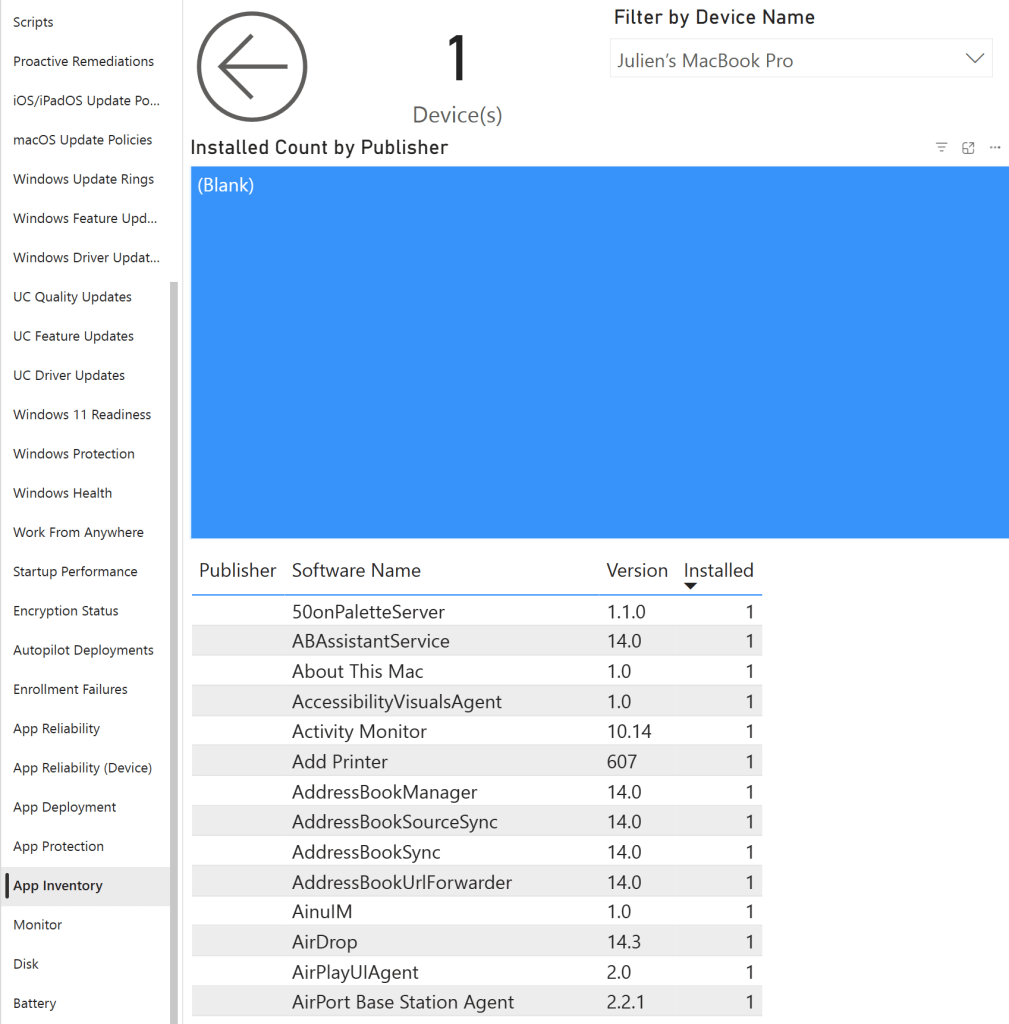
The App Inventory Page Will Display Apps Installed on macOS
Section titled “The App Inventory Page Will Display Apps Installed on macOS”